Comments and product reviews can answer questions, provide feedback and help future customers. They also need active moderation. This guide explains how to assess incoming messages, control publication and avoid confusing criticism with spam. Use it as part of your regular content or store-management routine.
Decide where discussion belongs A blog may benefit from comments while a service page may not need them. A product review has a different purpose from a general contact enquiry. Decide which areas should accept discussion and who is responsible for checking new submissions.
The global settings under Settings → Discussion govern aspects of comment behaviour, but existing pages and posts can retain individual settings. WooCommerce has separate product-review controls, including settings under WooCommerce → Settings → Products and product-level options. Theme and plugin customisations may add their own controls.
Review the moderation queue Open Comments and inspect messages awaiting approval. Use the available filters to separate pending, approved, spam and trashed items. Depending on the WooCommerce version, product reviews may also have a dedicated management screen under Products. Use the route provided by your site’s configuration.
Read the full message before acting. Check whether it relates to the article or product, adds a real question or experience, contains suspicious links, or exposes private information. Avoid clicking unfamiliar promotional links while assessing spam. A message can look polite and still be an automated link advertisement.
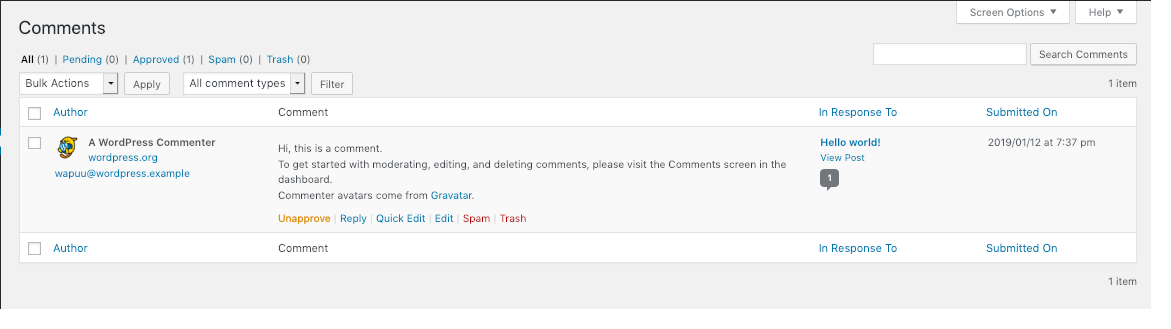
Choose the right moderation action Approve relevant messages that meet your published discussion rules. Reply where a short answer will help the customer and future readers. Use Spam for clear unsolicited spam and Trash for items you are removing for another reason. Check the spam queue periodically because automated filtering can make mistakes.
Do not bulk-delete a large queue until you understand the filters and selection. A broad selection can include legitimate questions. For unusual volume, ask Digital Rebellion to review the existing anti-spam setup rather than installing several overlapping plugins.
Handle criticism constructively A negative review is not automatically spam. Read the concern, check the facts internally and respond without disclosing private order or customer details. A useful public reply acknowledges the issue, explains the next step and invites private follow-up through your normal support route.
For example: “Please contact our support team with your order number so we can investigate the delivery.” Do not ask a customer to publish their address, payment details or account password in a comment. Avoid making public promises about refunds before checking the actual case and your business policy.
Keep reviews trustworthy Publish genuine feedback according to a consistent policy. Do not write reviews while pretending to be a customer. If your store restricts reviews to verified buyers, understand what that setting verifies in your configuration; it does not make every claim in a review independently proven.
Product ratings can influence listing displays and customer decisions. When a legitimate review appears missing, check its approval status, the product’s review settings and caching before assuming it was lost.
Reduce unnecessary moderation work Close discussion on pages that do not need it and review whether older articles should remain open. Use the approved spam controls and moderation rules. Check the public form after changing settings so genuine visitors can still submit feedback where intended.
If the website is receiving abusive messages or repeated personal information, preserve relevant evidence privately and ask Digital Rebellion to help adjust the workflow. Avoid copying sensitive comments into a public knowledgebase or screenshot collection.
Frequently asked questions Does disabling comments remove old comments? Not necessarily. Closing new submissions and removing existing comments are separate actions.
Why does an approved comment still not appear? Check the correct page, pagination, theme display settings and cache, then report the exact URL and comment date if needed.