Store settings connect the products you publish to the checkout customers use. A small change can affect delivery availability, payable totals or customer emails. This Digital Rebellion guide explains the main areas to review and gives you a test plan for a deliberate change. Use the configuration agreed for your business as the baseline.
Record the current setup Open WooCommerce → Settings and identify the tabs available on your installation. Extensions can add their own settings. Record the business address, selling and shipping locations, currency and relevant operational contacts. Do not change the store currency or country merely to adjust the symbol on one product; existing orders and integrations need a consistent configuration.
Before making an operational change, write down the expected result for a sample customer. For example: “A customer in our local delivery area should see the local delivery method, while a customer outside that area should see standard shipping.” A concrete example makes testing more reliable.
Review shipping zones and methods Open Shipping → Shipping zones within the store settings. A zone describes a geographical area; methods within it define the available delivery options. Customers match the first applicable zone, so put more specific areas before broader ones.
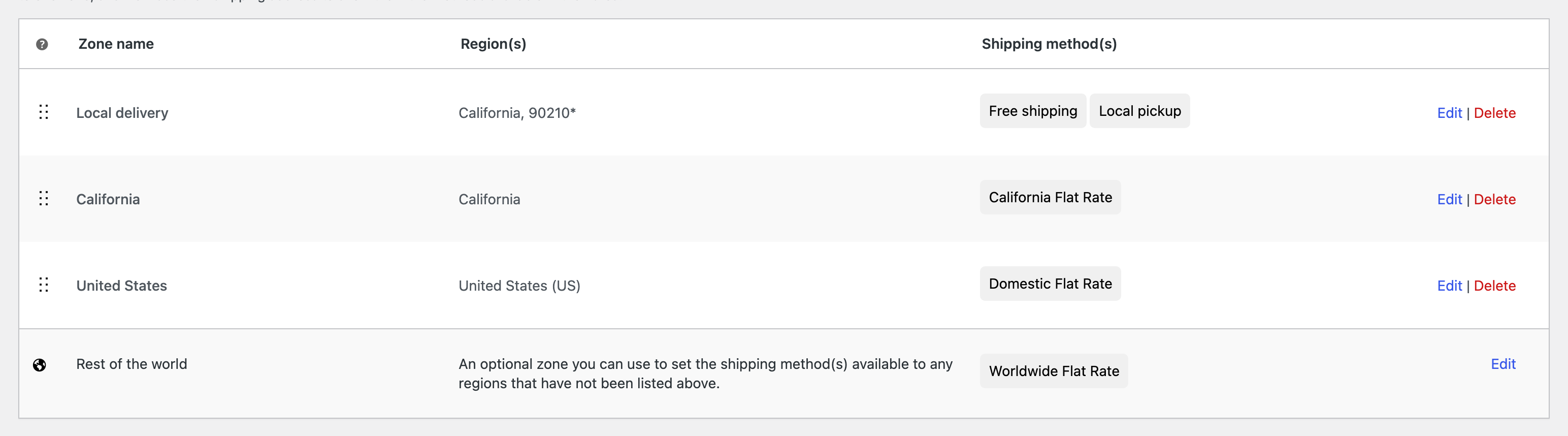
For each relevant zone, check the regions or postcodes and its methods. A flat rate is a pricing method, not a courier booking. A shipping class groups products for rate rules, not a geographical area. Free shipping has requirements that must match the promotion you advertise.
Review the fallback area, sometimes labelled Rest of the world. An area without an available method can prevent physical-product checkout. Do not add a cheap worldwide rate simply to remove an error message if you cannot actually deliver there.
Review payment methods Open Payments and inspect the providers already configured. Check the displayed method names, availability and operating mode. A gateway in test mode does not take normal live payments. A live gateway can create real charges, so use the provider’s documented testing method and an agreed test plan.
Do not paste API keys into public documents or screenshots. Provider account details, webhooks and domain changes may require coordinated technical work. For bank transfer, confirm the displayed account details through your trusted internal process before publishing any change.
Review tax configuration WooCommerce calculates according to its settings and extensions; it does not decide your tax obligations. Use the tax treatment and rates confirmed for your business by the appropriate adviser. Review whether entered prices include tax, how customer location is determined and how shop and checkout prices are displayed.
Avoid changing only one tax-display setting to make an example price look right. Inconsistent entry and display conventions can produce confusing totals or rounding differences. Test representative products and customer locations after any approved change.
Review emails accounts and customer pages Under Emails, confirm the recipients for staff notifications, sender identity and customer-facing content. Send or trigger an approved test and verify delivery. The store email address, site admin email and form recipient may all be different.
Review account creation and guest-checkout behaviour under Accounts & Privacy, plus the relevant customer policies. Confirm that Cart, Checkout and My Account use the correct assigned pages. Avoid casually replacing checkout blocks, shortcodes or templates on a live store.
Test the complete checkout Test an eligible local address, a wider supported address and an unsupported location. Include a physical product, a relevant variation and a virtual product if sold. Check discounts, tax, shipping, payment availability, confirmation page, emails and order creation. Test while logged out and on a phone.
Frequently asked questions Why is shipping missing? Check the matched zone, available methods, customer address and whether the product is marked Virtual.
Can I enable a new payment provider instantly? Account verification, configuration and testing may be required before it is ready for live customers.