SEO starts with publishing information that answers a real question and making it easy for people and search engines to understand. WordPress provides a useful publishing foundation, while your theme and SEO tools control additional output. This guide helps you prepare individual pages, posts and products without chasing scores or making promises about rankings.
Give every important page a clear purpose Choose one main question or customer need for the page. A service page might explain office cleaning in a specific service area; a blog article might explain how to prepare for a cleaner’s first visit. These pages can link to each other without repeating the same content.
Use the language customers use naturally. Include the subject in the title, opening explanation and relevant headings where it fits. Add original details such as what is included, who the service suits and what happens next. Avoid inserting town names or keyword phrases into every sentence.
Review the title and heading structure Your page title should describe its content accurately. Use H2 headings for main sections and H3 headings for supporting subsections. The visible page title is usually rendered as H1 by the theme. Verify the actual output before adding another H1 in the body.
Where an SEO plugin is configured, use its SEO-title field to write a useful search title. A working editorial target is roughly 50–60 characters, but display depends on text width and the search result. Put the distinguishing information early instead of squeezing in repeated brand names.
Write a useful meta description Summarise what the visitor will find and why the page is relevant. Roughly 140–160 characters is a practical drafting target, not a requirement or a guarantee that the entire description will display. Search engines may show a different snippet drawn from the page.
For example, “Compare office cleaning options, see what a routine visit includes and find out how to request a tailored quote” gives the reader a clear expectation. A description listing the same keyword five times does not.
WordPress core does not supply a universal SEO-description field for every editor. Use the site’s existing SEO plugin or approved integration. Do not install a second SEO plugin simply because you cannot find the current controls; duplicate output can create configuration problems.
Improve links images and URLs Use concise, readable slugs before first publication. Keep established URLs stable unless a meaningful change requires a redirect. Add internal links to genuinely useful next steps, using wording that describes the destination. Make sure important pages can be reached through navigation or contextual links.
Add informative images where they help explain the subject. Write alt text for the image’s purpose, not as a place to hide extra keywords. Product pages should include accurate specifications and purchase information rather than descriptions copied unchanged from another seller.
Check search visibility without making assumptions In Settings → Reading, WordPress has a setting asking search engines not to index the site. A live business website normally should not retain that request after launch. It does not provide password protection and does not guarantee that a URL stays out of search results.
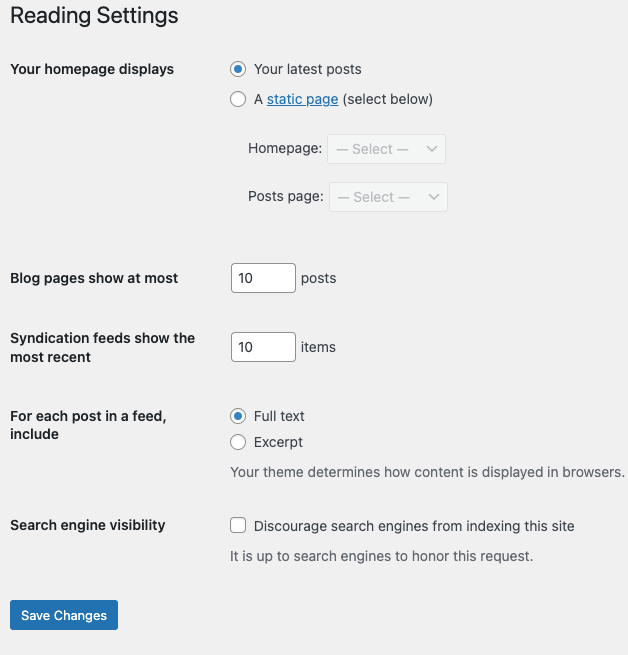
If a page does not appear in search, check its publication status, access restrictions and any page-level noindex setting. A sitemap can help discovery, but does not guarantee indexing. Have Digital Rebellion check canonical URLs, robots rules and technical errors when the cause is unclear.
Measure useful outcomes Review enquiries, sales and relevant search traffic over time. A plugin’s green indicator is an editing aid, not evidence of rankings. Update pages when your business information changes and improve content that leaves visitors with unanswered questions.
Frequently asked questions Does a meta description guarantee better rankings? No. Its practical purpose is to describe the page clearly when used in a search snippet.
Should every article target the same keyword? Give each page its own purpose and link related subjects together.